
If you are wondering what an APN is, you are not alone. Many people do not know what an APN is or what it is used for. But don’t worry, you’ve come to the right place! In this article, we explain everything you need to know about APNs.
What is an APN?
APN stands for Access Point Name. It is a set of information that allows your mobile device to connect to the Internet through your mobile provider’s data network.
An APN is a type of configuration your device needs to access the Internet through your mobile provider. It tells your phone which virtual route it should use to connect to the Internet. It also provides the route your phone needs to send and receive multimedia messages (MMS).
The APN settings define the access point name, username and password needed to configure mobile Internet access. Devices usually come with a number of predefined APNs. However, if you use a Mobile Virtual Network Operator (MVNO), you may need to enter the APN manually or contact your provider to find out whether it can send the settings directly to your phone in a configuration message.
If you need to configure it manually, bear in mind that each mobile provider has its own details. For Lowi, you will need the following information to configure your Internet connection:
- APN name: LOWI_Data
- APN: lowi.private.omv.es
- APN type: default,dun,supl
- MVNO type: SPN
- MVNO value: Lowi
Some phones do not show the MVNO fields. If yours does not, you do not need them. Leave all the other fields blank.
You can find all the information about Lowi’s APN settings on our website.
What is an APN used for?
An APN allows you to connect to the Internet through your mobile provider’s data network. Without the correct APN settings, your device will not be able to access the Internet using your provider’s mobile data network. This means you will not be able to browse the web, send emails or use apps that require an Internet connection.
How to configure an APN
Configuring an APN on your mobile device is a simple process that only takes a few minutes. Below, we explain how to do it on Android and iPhone.
How to configure an APN on Android
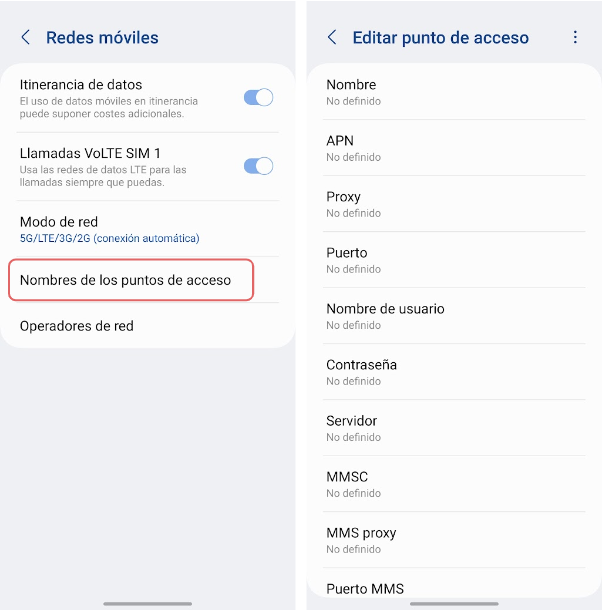
To configure the APN on your Android device, follow these steps:
- Open the Settings app on your device.
- Go to Connections or a similar section and select Mobile networks or More networks.
- Select Access Point Names or APN.
- Tap Add or the + icon to add a new APN.
- Complete the required fields, such as Name, APN, APN type, Username and Password, using the details provided by your mobile provider.
- Save the settings and select the APN you have just created.
How to configure an APN on iPhone
To configure the APN on your iPhone, follow these steps:
- Open the Settings app on your iPhone.
- Go to Settings > Mobile Data > Mobile Data Options > Mobile Data Network.
- Complete the required fields, such as Name, APN, Username and Password.
- Save the settings and select Mobile Data or Cellular Data to activate the data connection.
To restore your mobile provider’s default APN settings, go to Settings, then Mobile Data, followed by Mobile Data Network, and select Reset Settings.
APN: common problems and solutions
Users may occasionally experience problems with their APN settings. Here are some of the most common issues and how to solve them:
I cannot connect to the Internet using my provider’s mobile data network
Make sure the APN settings on your device are correct. If they are, try restarting your device or contacting your mobile provider for assistance.
My mobile data connection is slow
Your connection speed may be affected by your mobile provider’s network coverage. You can also try resetting the network settings in your device’s settings menu. If the problem persists, contact your mobile provider.
My device does not recognise the APN settings I entered
Make sure the information you entered is correct and that you saved the new settings.
In short, an APN is a configuration your device needs to connect to the Internet through your mobile provider’s data network. Configuring it is a simple process that you can complete by following the steps above. If you experience any problems with your APN settings, try the suggested solutions or contact your mobile provider for further assistance.
If you are travelling abroad, you may also want to read how roaming works and how to activate it.

Como tu operador SIMPLE, Lowi se especializa en brindar soluciones simples y eficaces en telecomunicaciones. Nuestro enfoque siempre se ha centrado en la innovación de nuestros servicios de fibra y móvil, así como en ofrecer la mejor atención para todos nuestros clientes. En este Blog, redactores especializados de Lowi compartimos nuestra experiencia en el sector tecnológico y de las telecomunicaciones, para mantenerte siempre conectado y al tanto de lo mejor del sector "techie" de una forma simple.