

We know how important it is to have a reliable Internet connection when travelling abroad. That is why Lowi enables roaming by default on all our customers’ plans.
If you are about to travel outside Spain and are wondering how you will connect to the Internet, you need to understand how roaming works and how to activate it on your mobile phone. You can find out everything about roaming in our help centre.
What is roaming?
Roaming is a service that allows you to use your mobile phone outside your country of residence or the country where you purchased your mobile plan, without changing your SIM card.
Thanks to roaming, you can keep your phone number and continue using your mobile data and calls, together with the other benefits included in your plan, while travelling abroad.
We will now explain how roaming works. You can also read more about what roaming is to gain a better understanding of this technology.
How does roaming work?
Roaming works through agreements between mobile providers that allow customers to use other companies’ networks while abroad. When you arrive in another country, your mobile phone connects to the network of a local provider.
There is currently an agreement that allows you to use roaming in the EU without paying additional charges. However, roaming outside the EU is not always free. Roaming charges can vary significantly depending on the country and mobile provider.
It is important to check the prices before travelling to avoid unexpected charges on your bill.
Make sure you know your provider’s roaming rates, as well as the rates charged by the foreign providers with which it has agreements. You should also check the usage limits and billing policies, including charges per minute or per MB used.
If you are a Lowi customer, follow these steps to check whether you can use roaming in the country you are visiting:
- Go to the Lowi roaming page.
- Select the country from which you will use your line and choose how many GB your plan includes.
- Click “Mostrar tarifas” (“Show rates”) to see the prices that apply in that country. If a roaming agreement applies, as it does within the EU, you can continue using your data and minutes at no additional cost.
To learn more about how roaming works, visit the official European Union website. There, you can find information about roaming and data roaming, including fair-use policies and contractual limits when travelling to another EU country.
How to activate roaming on your phone
Before travelling abroad, contact your mobile provider and make sure your SIM card is enabled for roaming. Roaming is usually activated by default, but it is worth checking.
Once roaming is enabled on your SIM card, you will need to activate data roaming on your mobile phone. The process is simple on both Android and iOS:
- Go to Settings > Mobile networks, or the equivalent menu on your device.
- Find Data roaming or Roaming and enable it.
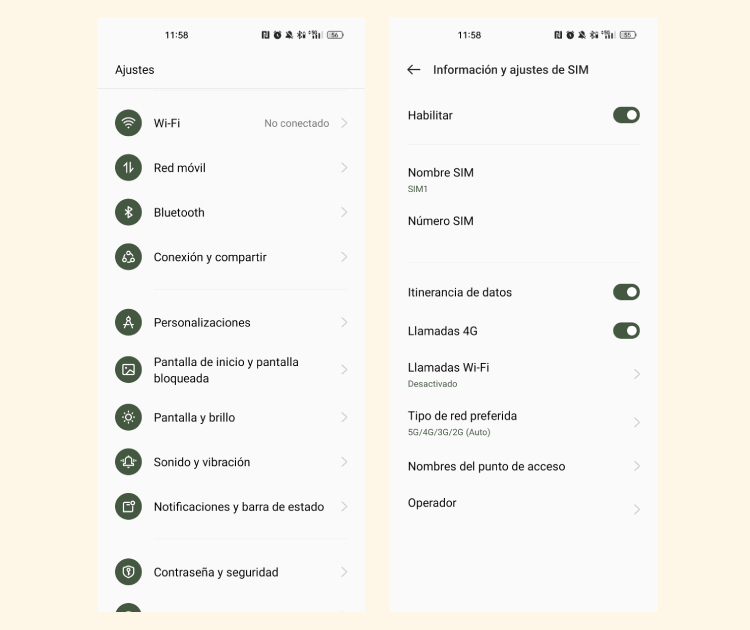
That’s it! Roaming is now activated, and you can use your phone to make calls and access the Internet outside your country of residence.
If you are wondering how to activate Lowi roaming, you only need to configure your phone’s settings as described above. Roaming is already enabled by default on all our plans.
How can I check whether roaming is activated on my phone?
If you have followed the steps above and want to check whether roaming is active, the process is very simple:
- Go to your phone’s settings and look for the Roaming or Data roaming option.
- Select Roaming and check whether the service is enabled or disabled.
- If you are already abroad, look for a roaming icon on your phone’s screen, usually in the status bar. An “R” may appear next to the signal bars.
- Once abroad, you may also notice that the provider name displayed in the notification bar is different from the company that provides your service in Spain.
How to deactivate roaming
Once you return to your country of residence, we recommend deactivating roaming on your mobile phone. To do so, follow these simple steps:
- Go to your phone’s settings and look for Roaming or Data roaming.
- Select the option and deactivate the service on your phone.
- If you want to deactivate roaming on your SIM card for any reason, contact your provider’s technical support team.
That’s it! You have now deactivated roaming. This will help you avoid additional charges for using your phone outside your country when no roaming agreement applies.
Difference between roaming and international calls
Essentially, roaming allows you to use your mobile phone in another country without changing mobile providers. International calls are calls made from one country to a phone number in another country. These calls often carry higher charges unless they are covered by an agreement or your plan.
When using roaming, you may be able to call Spanish phone numbers without additional charges, provided that this is included in your roaming conditions. Calls to foreign numbers may be billed differently depending on your location, destination and plan. Read more about Lowi international calls and the applicable rates.
Another feature of international calls is that you need to dial the country code before the phone number, such as +34 for Spain.
We hope this guide has helped you understand how roaming works, how to activate it and the benefits it provides when travelling abroad. If you need to connect several devices while you are away, take a look at our guide to portable WiFi and MiFi routers.
At Lowi, we are committed to providing a reliable mobile service so that you can enjoy your travels without worrying. Take a look at our 5G plans and browse at maximum speed in Spain or abroad.
Frequently asked questions about roaming

Como tu operador SIMPLE, Lowi se especializa en brindar soluciones simples y eficaces en telecomunicaciones. Nuestro enfoque siempre se ha centrado en la innovación de nuestros servicios de fibra y móvil, así como en ofrecer la mejor atención para todos nuestros clientes. En este Blog, redactores especializados de Lowi compartimos nuestra experiencia en el sector tecnológico y de las telecomunicaciones, para mantenerte siempre conectado y al tanto de lo mejor del sector "techie" de una forma simple.